
Clarivellum
Build intelligence for CMake projects


Instantly Spot Bottlenecks And Inefficiencies
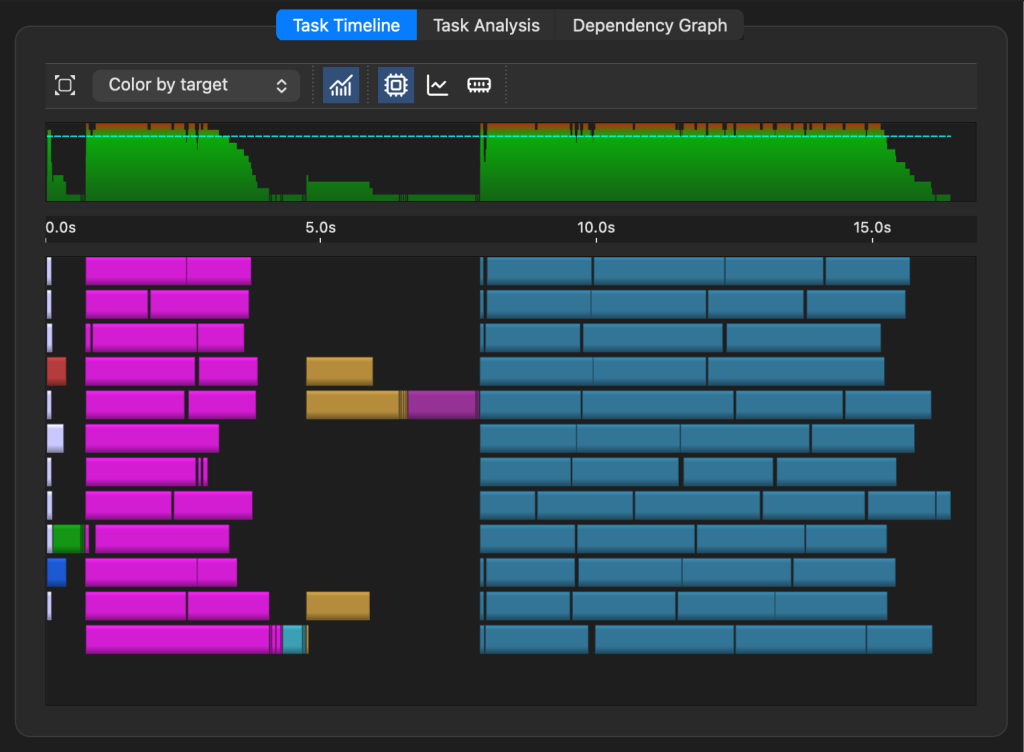
The task timeline provides an instant visual picture of what’s happening during a build, test suite execution, or an install.
- Identify tasks that block other tasks and stall throughput, leading to poor CPU utilization.
- Color tasks by type or CMake target to quickly narrow down problem areas.
- Interactively explore tasks, showing details like the command line, input source file, output files, and other relevant information.
Spot Performance Regressions With Historical Trends
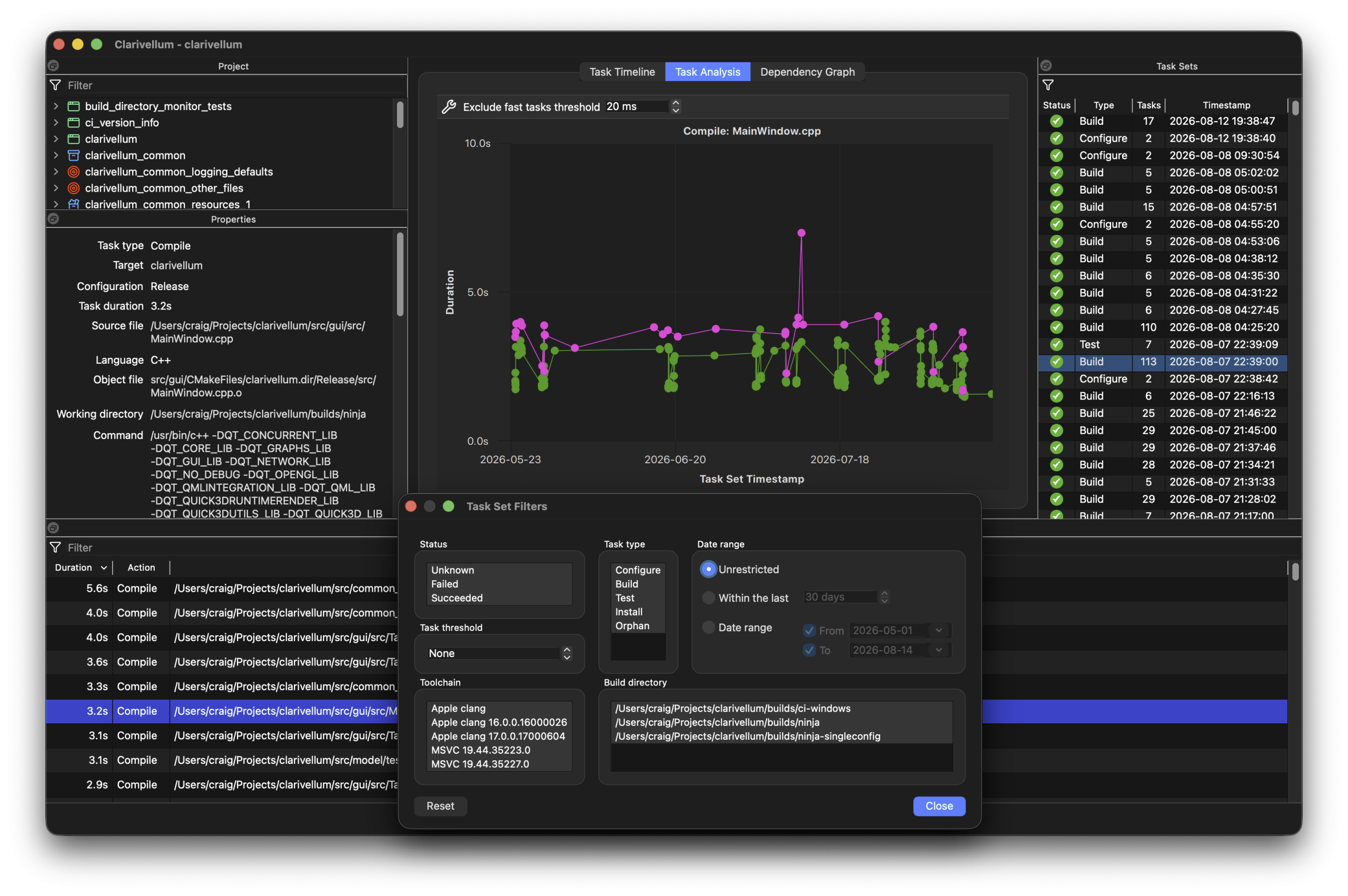
Explore how task times vary within a build or test suite execution, or track the duration of a specific task over time across all imported results.
- Select different task sets and see tasks sorted by duration. Flexible filtering of tasks and task sets enable you to focus on what you’re interested in (build configuration, toolchain, build directory, time range, task substring match, etc.).
- Create plots of task duration over time, showing historical trends and build or test performance changes.
- Flexible criteria can be applied to show subsets of a task’s history as separate data series on the one plot (Debug versus Release, separate by toolchain, build directory, etc.).
Explore Targets And Dependency Relationships
- Fine-grained target-level dependency information is available for every target.
- See which dependencies affects compiling, linking, or just build order, and whether each dependency affects the target itself (PRIVATE), anything linking to the target (INTERFACE), or both (PUBLIC).
- When using a multi-config CMake generator, see which dependencies apply in which build configurations. Using a dependency only in Debug builds? No problem, Clarivellum shows you that.
- A targets tree view shows all targets defined or used by the project, including imported and custom targets. Filter by substring match and target type, with special support for internal targets generated by CMake.
- COMING SOON: Interactive dependency graph viewer

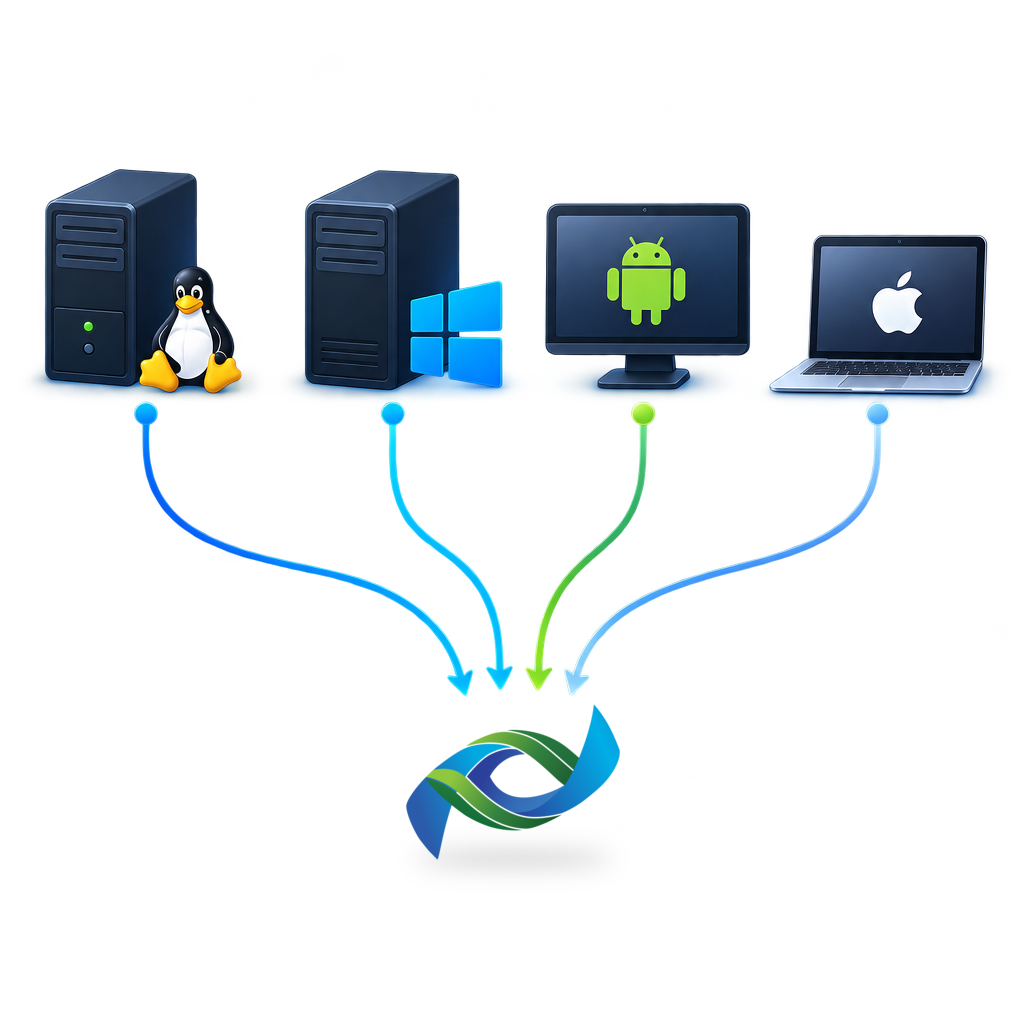
Compare Results From A Wide Variety Of Builds
Import results from any number of build directories, including across machines and toolchains.
- Data collection only requires CMake, no other tool needs to be installed on the build machine.
- An MIT-licensed CMake script is provided for collecting results. Add it to your project and include it, no further configuration is required.*
- Clarivellum automatically monitors local build directories for new data, enabling you to explore new results as soon as they arrive.
- Results from remote machines can be copied locally using whatever method works for your situation. Clarivellum does not need access to the machine where builds occur and doesn’t need to run other tools.
- View all your results coherently in one place. Clarivellum runs on Linux, Windows, and macOS (see Downloads for minimum OS and platform requirements).
* CMake currently only supports collecting instrumentation data with Ninja, Makefiles, and Fastbuild generators. Instrumentation is not supported for Visual Studio or Xcode generators, so Clarivellum also does not support data collection for those.
Your Data Never Leaves Your Machine
Your build data is just as sensitive as the rest of your project. Clarivellum respects that and doesn’t share your project or instrumentation data with anyone.
- All analysis is performed locally. None of your project, build data, or instrumentation results leave your machine.
- None of your project, build data, or instrumentation results leave your machine.


Power-up Your AI Agent With Project Insights
COMING SOON: Connect your preferred AI agent to Clarivellum’s MCP server.
- Give your AI agent the ability to see the impact of its changes on build and test times.
- Enable your AI agent to identify problematic files and targets, then iterate on improving build and test performance.
- Pair your AI model’s coding capabilities with Clarivellum’s build performance analysis so the model can choose more build-friendly code structures.
- Clarivellum performs the analyses on the raw data, saving AI tokens and limiting model context blowout.
Choose the tools that fit your CMake workflow
Start building smarter CMake projects with Clarivellum. Explore the available options and choose the solution that fits your development workflow.
Build intelligence for CMake projects
Interactive exploration and actionable insights for your CMake builds
Instantly Spot Bottlenecks And Inefficiencies
The task timeline provides an instant visual picture of what’s happening during a build, test suite execution, or an install.
- Identify tasks that block other tasks and stall throughput, leading to poor CPU utilization.
- Color tasks by type or CMake target to quickly narrow down problem areas.
- Interactively explore tasks, showing details like the command line, input source file, output files, and other relevant information.
Spot Performance Regressions With Historical Trends
Explore how task times vary within a build or test suite execution, or track the duration of a specific task over time across all imported results.
- Select different task sets and see tasks sorted by duration. Flexible filtering of tasks and task sets enable you to focus on what you’re interested in (build configuration, toolchain, build directory, time range, task substring match, etc.).
- Create plots of task duration over time, showing historical trends and build or test performance changes.
- Flexible criteria can be applied to show subsets of a task’s history as separate data series on the one plot (Debug versus Release, separate by toolchain, build directory, etc.).
Explore Targets And Dependency Relationships
- Fine-grained target-level dependency information is available for every target.
- See which dependencies affects compiling, linking, or just build order, and whether each dependency affects the target itself (PRIVATE), anything linking to the target (INTERFACE), or both (PUBLIC).
- When using a multi-config CMake generator, see which dependencies apply in which build configurations. Using a dependency only in Debug builds? No problem, Clarivellum shows you that.
- A targets tree view shows all targets defined or used by the project, including imported and custom targets. Filter by substring match and target type, with special support for internal targets generated by CMake.
- COMING SOON: Interactive dependency graph viewer
Compare Results From A Wide Variety Of Builds
Import results from any number of build directories, including across machines and toolchains.
- Data collection only requires CMake, no other tool needs to be installed on the build machine.
- An MIT-licensed CMake script is provided for collecting results. Add it to your project and include it, no further configuration is required.*
- Clarivellum automatically monitors local build directories for new data, enabling you to explore new results as soon as they arrive.
- Results from remote machines can be copied locally using whatever method works for your situation. Clarivellum does not need access to the machine where builds occur and doesn’t need to run other tools.
- View all your results coherently in one place. Clarivellum runs on Linux, Windows, and macOS (see Downloads for minimum OS and platform requirements).
* CMake currently only supports collecting instrumentation data with Ninja, Makefiles, and Fastbuild generators. Instrumentation is not supported for Visual Studio or Xcode generators, so Clarivellum also does not support data collection for those.
Your Data Never Leaves Your Machine
Your build data is just as sensitive as the rest of your project. Clarivellum respects that and doesn’t share your project or instrumentation data with anyone.
- All analysis is performed locally.
- None of your project, build data, or instrumentation results leave your machine.
Power-up Your AI Agent With Project Insights
COMING SOON: Connect your preferred AI agent to Clarivellum’s MCP server.
- Give your AI agent the ability to see the impact of its changes on build and test times.
- Enable your AI agent to identify problematic files and targets, then iterate on improving build and test performance.
- Pair your AI model’s coding capabilities with Clarivellum’s build performance analysis so the model can choose more build-friendly code structures.
- Clarivellum performs the analyses on the raw data, saving AI tokens and limiting model context blowout.